
Name-Based Case Searches
Swain cases live in the free North Carolina eCourts Portal, which runs on the statewide Enterprise Justice system. Start with Smart Search. Type a party name as last, first. The system insists on a basic query before any Advanced Filtering Options unlock. After the name, add Swain as the location. From there, sort the look-alike matches by case type, status, or the party criteria on offer. Date of birth is masked in public results. So confirm the public case number, party role, case type, and filing details before treating a name match as the right Swain court docket.
- Open Smart Search and enter the party name in last-name, first-name order.
- Choose Advanced Filtering Options only after the basic name search is present.
- Select Swain as the location and add a case type or status when it helps separate results.
- Open the underlined case number, then compare the Case Summary details with the known court matter.
The Portal supports wildcard searching, but casting too wide a net can bury the right Swain case. A last name needs three characters before *. A first-name wildcard needs one character first. Business names can stumble when the first three characters contain a space or a special character.
| Field label | Type | Required | Swain search use |
|---|---|---|---|
| Search Criteria | Text | Yes | Enter a case number or party name before filters. |
| Location | Selector | No | Choose Swain to narrow a statewide result. |
| Party criteria | Date or range | No | Validates a party without exposing a full public birth date. |
| Case type and status | Dropdowns | No | Refines public civil, criminal, estate, or other available results. |
Swain Case Search Filters
A common surname drags in results from all over North Carolina. The workable Swain sequence goes broad first. Filter by location next. Then check party role, case type, status, and filing date. One search tops out at 200 results. A notice saying 200 records came back is a cue. Narrow the query. It is not proof that anyone saw the full set of matches. The Portal also accepts a citation number, attorney name or bar number, business name, cross-reference number, nickname, or record number. That applies where the public interface allows.
The Judicial Branch Portal training resources explain each filter and where it stops. A Swain hit is just a lead. It cannot rule out a stranger with a similar name. It also cannot open material the Portal keeps out of public view.
The statewide Portal home screen lays out the layout plainly. Smart Search, Search Hearings, Make Payments, and NC Judgment Search each stand as separate tools. Each does one job.
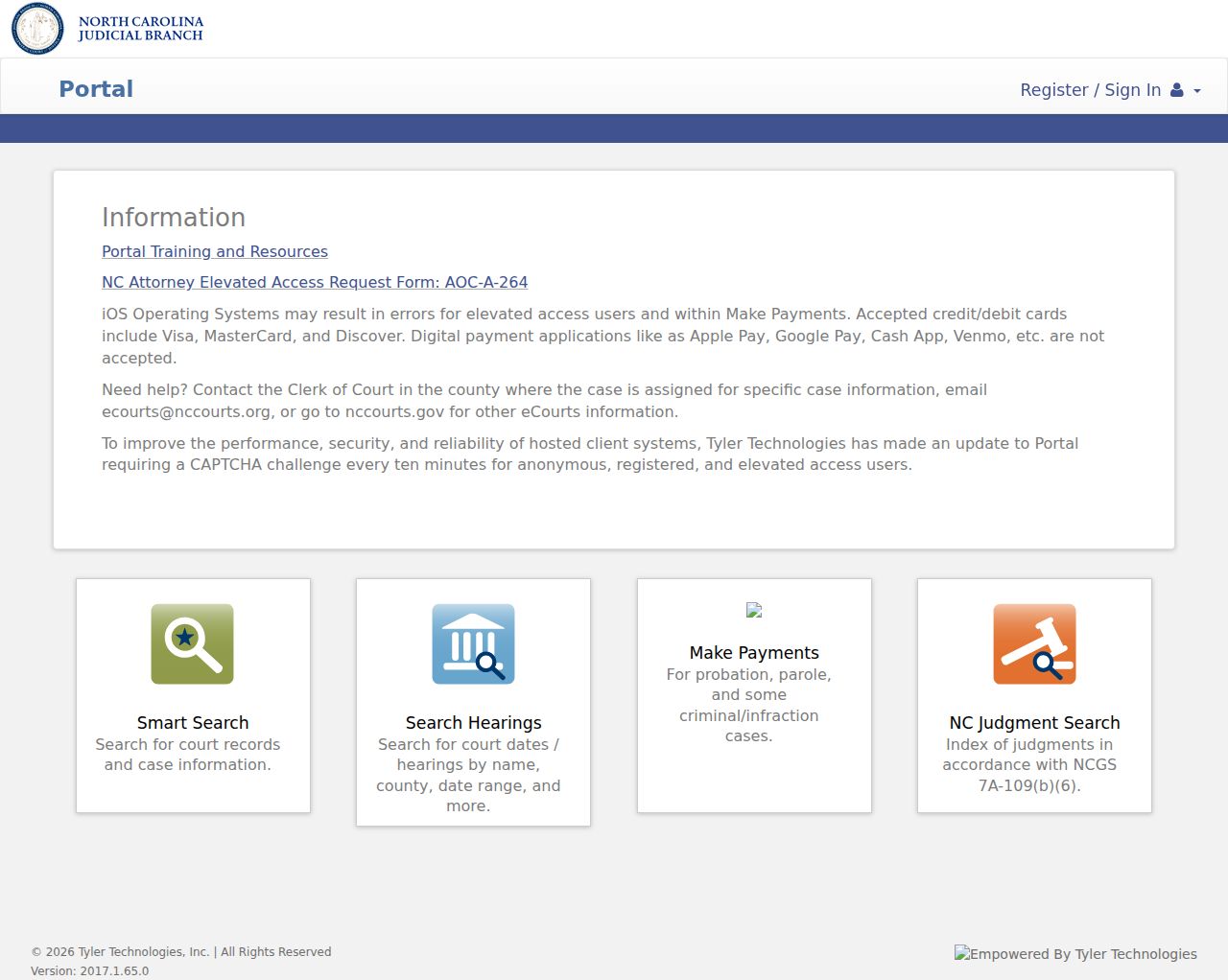
Smart Search gives you the Case Summary for a Swain case search. When the pressing question is a court date, Search Hearings is the better route.
Swain Case Search Result Ceiling
One Smart Search query tops out at 200 results. Seeing that maximum means the list needs work. Tighten the location, name, or date filter. Hitting the cap does not mean every matching Swain case got a full review. Remember, too, that the advanced filters unlock only after a basic search criterion goes in.
Case Number Searches
For a known Swain court docket, nothing beats a case number. Enterprise Justice builds each one from a two-digit year, case-type letters, a six-digit sequence, a hyphen, and a three-digit county identifier. The official format-only example is 21CR000003-910. It shows the structure only. No actual Swain case sits there, and no person's record either. Type the full identifier into Smart Search. A partial-number wildcard needs four characters before the asterisk.
Select the underlined number once the result appears. That opens the Case Summary, called the Register of Actions in Portal material. Check the identifier and case type before trusting the event list. Older Swain records converted into the current system can display a 12:00 AM event time. That is a conversion artifact, per the official materials. It does not mean anything actually happened at midnight.
Swain Case Search and Hearings
Smart Search and Search Hearings answer different questions. The first opens a case's information, events, dispositions, and financial information where available. Search Hearings watches the live calendar. Its fields cover location, hearing type, search type, a matching criterion, and a date range. Search types include case number, party name, business name, attorney name, attorney bar number, judicial officer, and courtroom. Pick the one that fits.
Set the location to Swain. Add a date range for a current setting. The hearing result can list a location, courtroom, date, time, judicial officer, and hearing type. It says nothing about virtual versus in person. Nor does a calendar entry promise the order in which cases will be called. For an imminent Swain setting, pair the Portal result with the clerk contact directory or the official civil and criminal calendar links.
Swain Case Search Name Checks
A public name match still needs context. Compare the Swain location, party role, case type, filing date, and case number before trusting a hit. Date of birth stays masked. Wide wildcards drag in strays. A no-result or shaky match belongs with the local clerk, asked as a focused question rather than an assumption about the underlying case.
Case Search Results Explained
Clicking a public result brings up a Case Summary, not a single scanned docket sheet. What panes appear depends on the case type and the public-access rule that applies. Read it in a sensible order. Confirm the identifier first. Then check parties and assignment. After that, review Case Events in date order, then Hearings and Dispositions. Financial figures can help. Still, ask the clerk to confirm any amount before you rely on it.
| Case number | The Enterprise Justice identifier that opens the Case Summary. |
|---|---|
| Case and assignment information | High-level public case facts and court or assignment details when shown. |
| Party information | Public party names and roles, with privacy limits such as masked birth-date detail. |
| Case Events | A dated record of filings, orders, hearings, transfers, or other recorded actions. |
| Hearings and disposition | Current scheduling and recorded outcomes when the corresponding sections exist. |
| Documents | Public documents may be available individually; a large-file error should be taken to the clerk. |
Swain Case Summary Limits
The Portal is free for anonymous public use. It is not, though, the official court record. A Swain County result can look current. It may still leave out a protected document, a restricted category, or an older item the clerk must review. NC Judgment Search works as an index and reference view. It cannot replace the full Smart Search Case Summary. For a disposition index it may help. But the Judicial Branch points users to Smart Search and the county clerk for complete case information and current financial totals.
The Portal FAQ explains that public documents download one at a time. Heavy processing volume can affect what is available. Need an official copy, a certified disposition, or a document that will not open? Go to the Swain Clerk of Superior Court. That split matters. An online case lead and a court-held record are different things. Knowing the difference saves time.
Swain Case Search Official-Copy Route
Once a public Swain case turns up, write down its number. Also name the exact document or certification you need. Treat the eCourts Portal as a research and scheduling tool, not the official record. The Swain County Clerk of Superior Court keeps the local case file. That office can arrange an in-person review or a public terminal search. When access is permitted, it is also the right source for an official copy.
Two Ways to Search: County and State
No separate Swain-only docket vendor exists. The North Carolina eCourts Portal is statewide. Its Swain location filter narrows a search to local cases. County routing still matters. The Swain clerk holds the local file and provides official copies. So use the Portal for public case information and current hearing research. Then turn to the local office for file inspection, certification, or a case-specific question.
| Statewide Portal search | Swain local record route |
|---|---|
| Covers North Carolina public records in Enterprise Justice, with Swain selectable as a location. | Centers on the Swain case file held by the Clerk of Superior Court. |
| Free anonymous Smart Search and Search Hearings access for public information. | Public terminal, counter review, copies, and certification during local office access. |
| Best for locating a case, reading public events, or checking a hearing. | Best for an official copy, a non-opening document, or a record question the public display cannot settle. |
Swain Portal Account Access
Registration is optional. An anonymous visitor can search public Swain case information without paying or signing in. Creating an account adds the My Cases convenience feature for saving cases; it does not add ordinary public-record access. Elevated access is limited by authority, so an account should not be treated as a way around a sealed, confidential, or otherwise restricted record.
The official Portal resource page separates search functions from filing. Portal is not a filing tool. File & Serve is the distinct electronic filing system, so a public case search does not submit a pleading or alter a Swain court docket.
The official training resource view documents public search and account guidance without relying on a live personal case.

Those materials point to the same practical sequence. Run a public search to identify the Swain case, then ask the clerk for the official record when the matter requires proof.
Which Cases Stay Restricted
Public access has limits. Juvenile records are confidential under G.S. 7B-3000. The Portal FAQ also lists unreturned criminal warrants and protected material as categories that may require another lawful channel or elevated access. Domestic-violence information carries its own public-status and online-access rules. Keep one caution in mind: a missing result never proves a restricted Swain record does not exist.
Sealed and expunged matters may simply not appear in ordinary public results. "Pending Expungement" is a Portal status label, not proof that removal is complete. If you wonder about the public status of a specific local file, call the Swain Clerk of Superior Court. Guessing from an empty result is the wrong move.
Swain Case Search Follow-Up
When a search finds the right case, record the case number, case type, and the document or event you need before contacting the clerk. The Swain courthouse office can lay out the local file-review and copy path. Public self-service terminals remain a fallback for a case that will not resolve online. For the full copy and certification process, see Swain County Court Case Records.
North Carolina finished Enterprise Justice conversion in all counties in October 2025. That statewide change makes a location-filtered Portal search the normal first step for Swain, yet it does not change who keeps the official file. The Clerk of Superior Court still holds Superior and District Court records locally. A case number plus a precise question helps staff identify the correct public file or copy process faster than a vague inquiry.